
Workflow deep dive
Read this page when you need to understand why a step needs particular evidence or where a failed assumption should return. Use the workflow overview for the normal sequence and the linked step pages for exact outputs.
Mental model
Section titled “Mental model”A human selects a main agent. That agent reads current project evidence, performs its task, and produces artifacts. Required reviews and approvals determine whether the next step can proceed. Helpers can perform permitted bounded tasks, but the main-agent sequence remains approval-gated. The current body migration retains named roles while changing runtime task handling, not domain artifacts.
| Record | Purpose | What it does not prove |
|---|---|---|
agent-output/{project}/ | Requirements, decisions, reviews, contracts, and observed results | A file’s presence does not establish freshness or approval. |
Primary session state through apex-recall | Current decisions, findings, and step progress | State does not authorize deployment or replace reviewed artifacts. |
| Workflow graph | Dependencies, expected outputs, and review defaults | An edge does not execute an agent or grant permission. |
The five context surfaces
Section titled “The five context surfaces”Skills
Section titled “Skills”An agent reads the skill required for its task, then relevant references or templates. Discovery metadata helps identify a skill; it does not prove that its instructions loaded. Load required guidance explicitly when needed.
Instructions
Section titled “Instructions”An instruction’s applyTo pattern describes intended file matching. Essential
approval and stop rules still belong in the main agent’s instructions. Verify
runtime attachment separately from authoring-file syntax.
.GitHub/data/ registries
Section titled “.GitHub/data/ registries”Module catalogs, lifecycle information, deprecation data, and governance evidence help the planner avoid unsupported choices. Check their scope and freshness. A test fixture or fallback dataset is not evidence of the target subscription’s current effective policy.
APEX-Recall
Section titled “APEX-Recall”Use apex-recall show <project> --json for current state. Use supported commands
for updates, and keep recorded decisions tied to actual owner choices.
show does not restore backups. A write can commit while leaving its derived
index stale. Conflicts, recovery, and idempotent retries have distinct outcomes.
See session state debugging and the
public schema.
Hooks and validators
Section titled “Hooks and validators”Git hooks and CI run configured checks. The owner retired APEX .github/hooks/
runtime hooks in the October 18 migration. Their protection is no longer present;
do not restore or replace them. Native permission boundaries still need verification.
See the retirement record. Git Lefthook, pre-commit security
checks, and underlying Azure requirements are not retired.
Each remaining mechanism covers specific rules, not all correctness or safety.
Independent review evaluates the requested artifact scope separately from these
checks. In the owner-approved shared-review candidate, automatic producers and
optional manual 10-Challenger reviews use the same read-only
challenger-review-subagent. The interactive owner captures metadata and records
the actual attributed synchronous task output centrally. Required receipts,
strict freshness, schema, provenance, and separate owner approvals remain.
The final source revision and native runtime evidence are pending. See
review finalization and recovery.
Explicit lab risk acceptance
Section titled “Explicit lab risk acceptance”This capability requires an APEX runtime with risk-authorization-v1 and apex-recall check-gate.
It was merged into APEX main on October 10, after this site’s pinned source, so it is not established by that source.
The current-source maintainer contract
defines the signed records and operator setup.
An authorized owner can accept a specific unremediated Plan risk for a non-production lab when remediation is
not feasible. Acceptance leaves the original findings, severity, review verdict and hashes unchanged. The gate
reports exception-authorized; a NEEDS_REVISION review does not become APPROVED.
An operator must verify each signer’s delegated authority and install a protected external trust configuration.
The owner selects individual finding IDs and signs the exact project, actions, review bytes, artifact hashes,
supporting inputs, residual impact, validity window and verification obligations. An independent reviewer signs
the eligibility assessment. Chat consent or an accepted_risks decision supplies no risk-owner authority.
Applicable law and technical deployment impossibility cannot be waived. A mandatory governance or security requirement needs a valid exception from that rule’s authority. Best-practice guidance alone is not a mandatory rule. Unresolved eligibility, missing authority, changed hashes, expiry and revocation block progression.
Kit maintainer authorization can permit Plan approval and CodeGen without claiming adopter tenant approval. Deployment requires a separate adopter authorization for the actual lab tenant, subscription, event, inputs and phase. It must name the cleanup owner and teardown obligations. Kit approval permits neither deployment nor production reuse. Collect execution and teardown evidence afterward, never as invented pre-deployment proof.
The owner evaluates authorization first, then asks the authorized human for separate gate approval. Completion, transition, resume and downstream entry use the same evaluator for the requested action and block when evidence is missing, expired, revoked or changed. CI and GitHub checks report the same problems as warnings only, so a lab never fails a pipeline on its own.
Apex-recall also checks step order: starting or completing a step before its predecessor is done is refused
unless a human passes --allow-out-of-order "<reason>", which is logged in decisions.order_overrides.
All existing review-integrity, code-validation, policy, preview and deployment approval checks still apply.
Existing projects receive no automatic authorization or migration. No Azure deployment was tested for this
documentation change; product regression tests use isolated synthetic lab evidence.
Stage-by-stage walkthrough
Section titled “Stage-by-stage walkthrough”
Step 0: project initialization
Section titled “Step 0: project initialization”Identify the project and read existing state before initializing anything. Capture the IaC choice through Requirements and retain explicit review-depth decisions. Normal review is the default. Complexity does not silently enable deep review.
Step 1: requirements
Section titled “Step 1: requirements”02-Requirements records the workload, constraints, and initial SKU manifest.
When directly selected, it asks about missing workload requirements through its
native question tool. A delegated worker returns USER_INPUT_REQUIRED to its
interactive parent instead. Complete the required independent review, resolve findings, and obtain
approval before architecture. Return here when an upstream requirement changes.
Step 2: architecture
Section titled “Step 2: architecture”03-Architect evaluates service choices and costs. Direct selection supports
native questions about missing choices or constraints; it does not require
Orchestrator as a question relay. The architecture assessment
and cost estimate receive independent reviews. Deep architecture review is opt-in
and does not replace the cost-estimate review. Preserve pricing assumptions and
their source rather than substituting remembered prices.
Step 3: design, optional
Section titled “Step 3: design, optional”04-Design creates diagrams and decision records when they help explain the
architecture. Directly selected Design asks material questions about design intent
itself. Design review is optional. The next required concern is governance,
whether or not this step runs.
Step 3.5: governance
Section titled “Step 3.5: governance”04g-Governance discovers effective policy, including inherited assignments, and
produces both Markdown and JSON constraints. Reconcile conflicts before planning.
Directly selected Governance asks about missing target scope or policy decisions
through its native question tool. A delegated worker returns the question to its
interactive parent without calling user tools.
If resolution changes the architecture, return to Architect and renew the affected
approval. An inaccessible scope is not an empty policy result.
Step 4: IaC plan
Section titled “Step 4: IaC plan”The shared 05-IaC Planner selects modules and versions, maps policy requirements,
and produces the IaC contract, policy-property map, and environment manifest.
Review the plan before CodeGen. An architectural gap belongs with Architect, not
in an undocumented code-generation workaround.
Step 5: code generation
Section titled “Step 5: code generation”Select 06b-Bicep CodeGen or 06t-Terraform CodeGen. Generate code from the approved
plan and produce 05-iac-handoff.json. Run the required deterministic checks.
Adversarial code review is opt-in. Return planning defects to the planner instead
of changing approved inputs during generation.
Step 6: deploy
Section titled “Step 6: deploy”Select the matching deployment agent. Check current code, handoff, environment, policy evidence, and preview before obtaining apply authorization. Reused validation must cover the current inputs.
Quota, SKU, or regional constraints can require a new design decision. Stop and escalate rather than substitute a resource automatically. Record provisioning results and application-health results separately.
Step 7: as-built
Section titled “Step 7: as-built”08-As-Built documents the observed resource inventory, operations, costs,
compliance evidence, and recovery procedures. Include missing checks and unresolved
issues. Do not infer a healthy application from a completed provisioning operation.
Post: lessons
Section titled “Post: lessons”Record recurring failures and their evidence during the run. Use the resulting lessons to propose reviewed changes to agents, skills, or validators. A lesson record does not authorize those changes automatically.
End-to-end run timeline
Section titled “End-to-end run timeline”The current sequence is Requirements, Architecture, optional Design, Governance,
Plan, CodeGen, Deploy, and As-built. The owner can select a main agent directly or
use Orchestrator to coordinate approved step dispatch. Native task results and
explicit selection replace UI handoff controls in the body migration.
00-handoff.md remains a durable artifact, not a UI declaration or approval.
The step table names the agents,
and the review matrix defines the
default reviews.
Historical workflow illustration
This imported illustration predates the current agent-body migration. It remains available for old links and historical comparison, not as execution guidance.
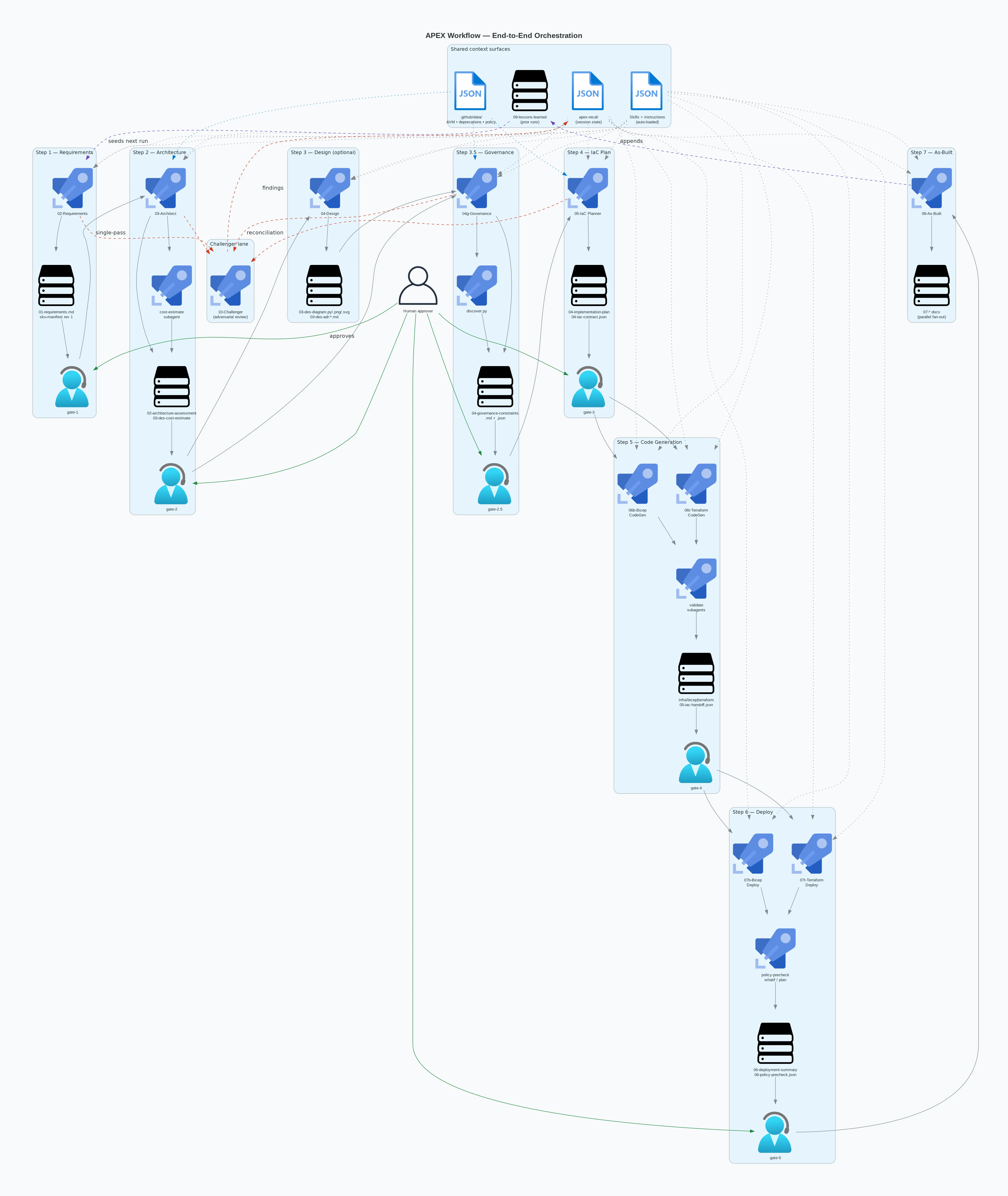
The retained domain sequence and ownership are described in the text above. Do not use the old delegation lanes to infer native tools, continuation support, or runtime certification. The body migration removes readiness handshakes and log preflight, but preserves review receipts, freshness checks, and approval gates.
The lessons-learned feedback loop
Section titled “The lessons-learned feedback loop”Capture an observation, its cause, the evidence, and a proposed correction in
09-lessons-learned.json. The related Markdown record explains the lessons to
readers. Review proposed improvements before changing the product.
The product’s report:challenger-gaps command can identify recurring lessons for
review. Its output is a proposal, not a new mandatory workflow rule.
Illustrative lesson entry
Section titled “Illustrative lesson entry”A useful lesson says which step failed, what input exposed the problem, and what should change. For example, a selected module version may lack a property required by discovered policy. The correction belongs in module selection and policy mapping, not in a deployment-time exception.
Use the lesson schema for an actual record. An illustration is not evidence that a run occurred.
Historical lessons illustration
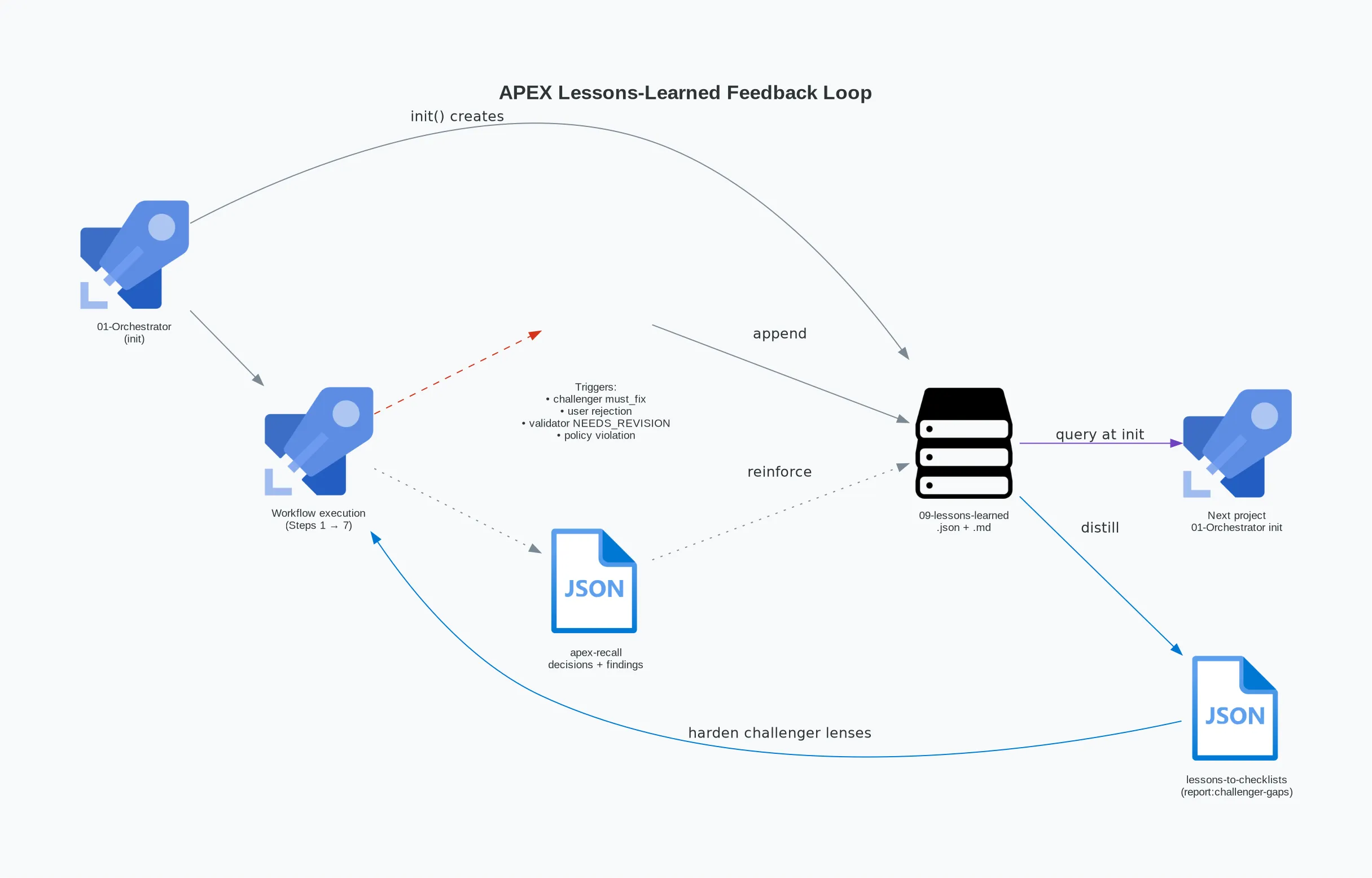
Reuse requires relevant evidence and reviewed changes. The illustration does not imply automatic modification of agents or approval rules.
APEX and Azure landing zones
Section titled “APEX and Azure landing zones”An Azure Landing Zone can supply management groups, policy, identity, networking, and shared services. Discover what the target environment actually provides. APEX workload planning is not a substitute for establishing the platform’s ownership and controls.
What greenfield means in APEX
Section titled “What greenfield means in APEX”A new workload can target an established landing zone. A new subscription can still require platform setup. Distinguish the application’s starting point from the state of its Azure environment.
What ALZ provides
Section titled “What ALZ provides”Identify inherited policy, role assignments, network connectivity, DNS ownership, and monitoring destinations. Verify resource IDs and permissions before referencing central services. Do not assume every landing zone has the same deployment.
ALZ layer and APEX step consumer
Section titled “ALZ layer and APEX step consumer”| Platform concern | Workload step |
|---|---|
| Effective policy and inheritance | Governance discovers constraints; Plan maps them to implementation. |
| Existing network and DNS ownership | Architecture selects connectivity; Plan records references and responsibilities. |
| Identity and role scope | Plan and CodeGen implement the approved access model. |
| Diagnostics and monitoring destination | Plan identifies ownership; CodeGen wires the approved resources; As-built records results. |
How ALZ guardrails accelerate and de-risk APEX
Section titled “How ALZ guardrails accelerate and de-risk APEX”Known policy and resource ownership reduce the choices a workload team must make. They do not remove discovery, review, or connectivity checks. If a platform rule conflicts with the design, resolve the conflict with its owner before generation or deployment.
When there is no landing zone
Section titled “When there is no landing zone”Record the absence of inherited controls and apply the current product defaults where permitted. Do not copy the historical four-tag fallback from an old example. The product’s repository instructions define the fallback. Failed discovery must not be treated as proof that policy is absent.
Network planning
Section titled “Network planning”Bring your own VNet vs. create new
Section titled “Bring your own VNet vs. create new”Establish whether the workload references an existing network or owns a new one. For an existing VNet, verify its resource ID, address space, required subnets, and permissions. Referencing a VNet does not authorize modifying platform-owned resources.
For a new VNet, the plan must account for address ranges, subnet requirements, routing, and the approved connectivity model. Use the current VNet planning reference.
Hub-spoke and virtual wan topologies
Section titled “Hub-spoke and virtual wan topologies”Identify who owns the hub, peering or Virtual WAN connection, routing, and firewall policy. Do not infer connectivity from the presence of a spoke VNet alone. Check the workload’s intended traffic paths and return routes.
Private DNS zones, enumeration and reuse
Section titled “Private DNS zones, enumeration and reuse”Verify the relevant zone IDs, links, permissions, and resolution from intended clients. Reuse central DNS only when its ownership and behavior are established. A zone-group policy does not prove that the DNS zone or VNet link exists.
Do not create duplicate policy-owned DNS resources. If a required component is
missing and policy prevents workload-side creation, escalate to the platform owner.
The older proposed private-dns-zone-baseline.json inventory is not a shipped
contract and must not be assumed to exist.
Recommended corp enforcement pattern
Section titled “Recommended corp enforcement pattern”Evaluate Deny and DeployIfNotExists assignments for their actual scope, parameters, managed identity permissions, deployment behavior, and remediation. A policy assignment alone is not proof that a private endpoint resolves or a network connection has been created.
Read the security baseline for private-networking requirements and the conditional monitoring exception.
Appendix a: artifact contract reference
Section titled “Appendix a: artifact contract reference”Use the canonical workflow graph
and the step guides.
Prefixes do not always match step numbers. Architecture produces
03-des-cost-estimate.md; Plan produces the 04- contracts; CodeGen produces
05-iac-handoff.json.
Appendix b: skills by step
Section titled “Appendix b: skills by step”Consult the selected agent’s body and the pinned Explorer for skill references. Do not interpret a source reference as proof that a skill loaded at runtime.
Appendix c: instruction scope
Section titled “Appendix c: instruction scope”The skills and instructions guide explains declared scope and attachment limits. Check the actual instruction file for its glob and requirements.
Appendix d: glossary
Section titled “Appendix d: glossary”Use the glossary for shared terms.